You can also take .wav files from the PC and load them into pre-formatted BR-8 songs. Sound good? It should. Not just because it's free, but because it adds extra versatility to your BR-8 digital recorder.
Tip #1: You will need a Zip drive on your computer (either a 100MB or 250MB version) in order to use the Wave Converter software.
Tip #2: Having a Zip drive on your PC also makes backup a hundred times easier than doing it on the BR-8. Please back up your BR-8 song data onto either your PC or onto another catridge before using the Wave Converter Software. You can never be too careful!
Tip #3: If you wish to convert a WAV file to BR-8 format, the WAV file must be a 16-bit, 44.1 kHz sample rate file, or it cannot be converted with this software.
Tip #4: If using a blank Zip disk, first be sure that the disk has been formatted by the BR-8.
Tip #5: Be sure to also download the instructions when you download the software. The instructions are a separate file that must be downloaded in addition to the software file. The software and instructions are (C) Roland Corporation.
Tip #6: The downloadable file is in Zip format. You will need a program, such as WinZip, to convert the file from its compressed state so it is ready to use on your PC.
BR-8 Resources | Musician's World Net
Free BR-8 Wave Converter Software 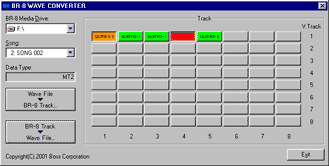 Boss has a free program called the BR-8 Wave Converter that lets you take BR-8 Zip disks, mount them on any PC with a Zip drive, and convert single or stereo BR-8 tracks to .wav files.
With the BR-8 Wave Converter you can:

Check online pricing for accessories
for the Boss BR-8 Digital 8-Track Studio
BR-8 Resources | Musician's World Net
